Closed Traverse Computation and Bowditch Adjustment in Excel: Angles, Azimuths, Coordinates and Closure
- XLSX
- 15 KB
- Version 1.0
- English
- October 23, 2026
Ready to download
Editable Excel file
This sheet is also available in: العربية
The traverse is the best-known way to fix ground control points: you measure angles and distances between a chain of stations and then compute the coordinates of each. When the traverse returns to its start it is called closed, and the closure gives you a rare chance: to judge the quality of your own measurement without any outside reference.
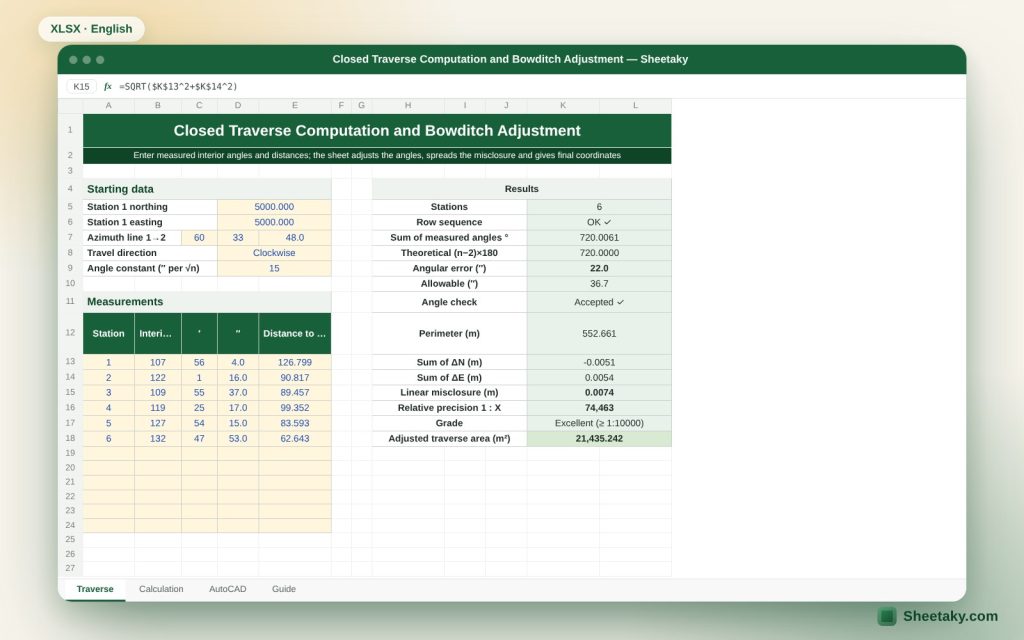
This sheet performs the whole computation cycle. You enter the measured interior angles (in degrees, minutes and seconds) and distances, the coordinates of the first station and the azimuth of the first line; it works out the angular error and compares it with the allowable value, adjusts the angles, computes azimuths and components, then spreads the linear misclosure over the sides by the Bowditch (compass) rule, and gives final coordinates, the relative precision 1:X and the area.
Who is it for?
- Surveyors doing ground control and point densification
- Surveying students and civil engineering graduates
- Site engineers who need reliable control points
- Consultants reviewing contractors’ traverse computations
What is inside the sheet?
- Entry for up to 12 stations: interior angles in degrees, minutes, seconds and distances
- Angular error and allowable value (precision constant × √n) with an acceptance status
- Line azimuths, ΔN and ΔE components and Bowditch corrections
- Final coordinates for every station
- Linear misclosure, relative precision with a grade, and traverse area
- An AutoCAD PLINE command and station points
- A guide sheet
How to use it
- Enter the coordinates of station 1 (northing and easting) and the azimuth of line 1→2 in degrees, minutes and seconds.
- Choose the travel direction, clockwise or anticlockwise, and enter the angle precision constant (for example 15 seconds).
- For each station enter the measured interior angle and the distance to the next station. The last line returns to station 1.
- Check the angular error against the allowable value. If it is exceeded, re-measure instead of distributing.
- Read the misclosure and relative precision, then take the final coordinates from the “Calculation” sheet.
Formulas used
Theoretical sum of interior angles = (n − 2) × 180°Angular error = measured sum − theoretical; correction per angle = −error ÷ nNext azimuth (clockwise) = previous + 180° − adjusted angleΔN = L × cos Az , ΔE = L × sin AzBowditch correction per side = −(misclosure × side length ÷ perimeter)Relative precision = perimeter ÷ linear misclosure
Worked example from the sheet itself
The example is a closed six-station traverse starting at northing 5000.000 and easting 5000.000, with a first-line azimuth of 60°33′48″.
- The measured angle sum is 720°00′22″ against a theoretical 720°, so the angular error is 22″ and the allowable is 15 × √6 = 36.7″: accepted.
- The perimeter is 552.661 m, ΣΔN = −0.0051 m and ΣΔE = +0.0054 m, so the linear misclosure is 0.0074 m.
- The relative precision is about 1:74,463, which is excellent, and the adjusted traverse area is 21,435.242 m².
Why a closed traverse and why compute it
When you move from station to station with measured angles and distances, small errors accumulate. In an open traverse you cannot know the size of the error because you have nothing to compare with. A closed traverse knows that you must return to the start and that the sum of interior angles of an n-sided figure is (n − 2) × 180 degrees. Any difference from that is your true error.
With these two conditions, the angle condition and the coordinate condition, you judge and correct the measurement. They also reveal gross errors: a large angle error shows in the angle condition, and a wrong distance reading shows in the linear closure without showing in the angles.
The calculation steps as the sheet does them
- Convert angles from D M S to decimal degrees and sum them.
- Compute the angular error = measured sum − (n − 2) × 180.
- Compare the error with the allowable a × √n seconds. If larger, re-measure.
- Distribute the error equally over the angles (−error ÷ n each).
- Compute each side azimuth from the previous azimuth and the adjusted angle.
- Compute ΔN = L cos Az and ΔE = L sin Az for every side.
- Sum ΔN and ΔE: both sums should be zero and what remains is the misclosure.
- Distribute the error over the sides in proportion to their lengths (Bowditch).
- Compute the final coordinates by accumulating the corrected values from station 1.
What the Bowditch (compass) rule means and when it is enough
The Bowditch rule assumes that distance and angle errors are roughly proportional to side length, so it distributes the error on each side in proportion to its length over the perimeter. It is the most common method in ordinary work because it is simple and gives acceptable results.
There are more rigorous methods such as least squares, which weight the measurements and are used by main control networks and specialised software. For setting-out and medium-sized sites Bowditch is enough with careful measurement.
How to judge the relative precision
A relative precision 1:X means the linear error is one part in X of the perimeter. Specifications differ on the required limit by type of work, but a common rule of thumb is 1:10000 or better for important work, 1:5000 for ordinary engineering work and 1:3000 as a minimum for simple detail work. Always use what your project specification or your country’s survey manual states.
The sheet gives a text grade at these levels, but it does not replace the project specification. And if the precision is poor, do not settle for distributing: look for the error.
How to find the source of a large error
If the angular error is acceptable but the linear closure is poor, a distance error is likely, and you can sometimes spot the suspect side: compute the direction of the misclosure (from the remaining ΔN and ΔE) and compare it with the side directions. If it is parallel to a side, that is probably where a wrong distance reading occurred.
If the angular error is large, review the angles of stations measured in poor conditions or from unstable points. Measuring on both faces and re-observing the backsight reduce these errors a lot.
Field tips for a better traverse
- Place stations so that side lengths are similar when possible, which reduces the effect of pointing error.
- Measure angles on both faces and take the mean, checking the difference between the two readings.
- Measure each distance at least twice and apply the atmospheric correction if your instrument needs it.
- Check the centring of the instrument and the reflector on the stations; error there is one of the main causes of poor closure.
- Tie the traverse to at least two known points where possible to secure a reliable direction.
Tips for best results
- Take the first azimuth from two known points to keep the traverse tied to the network.
- Do not distribute the angular error if it exceeds the allowable; re-measure.
- Use the resulting area to confirm that the traverse matches known boundaries.
Frequently asked questions
Does it work for an open traverse?
No. The sheet is for a closed traverse with interior angles because it relies on the angle condition.
How many stations does it support?
From 3 to 12 stations.
What does the precision constant 15 mean?
It is the constant a in the allowable a × √n seconds, and it varies with the instrument precision and the specification. Set it for your instrument.
Do I need true north?
The azimuth of the first line in the coordinate system you work in is enough, grid or local.
Download the sheet
Press the download button at the top of the page to get the Excel file. It includes a full guide sheet, yellow input cells and formulas protected from accidental edits. The sheet is also available in Arabic from the language switcher.
The sheet is a calculation aid. Use your project specification for the required precision.
Related sheets
Land surveying
Level Run Adjustment in Excel: Misclosure, Allowable Error and Correction
An Excel sheet for a level book between two benchmarks of known level: it computes levels by the…
Land surveying
Vertical Curve Table in Excel: Design Levels, High Point and K-Value Check
An Excel sheet for designing a parabolic vertical curve between two grades: it gives a level table at…
Land surveying
Irregular Plot Area from Coordinates in Excel: Area, Perimeter and Bearings
An Excel sheet that computes the area and perimeter of an irregular plot from its corner coordinates, with…