Variation Orders Log in Excel: Revised Contract Value, Time Extension and Approval Status
- XLSX
- 11 KB
- Version 1.0
- English
- October 23, 2026
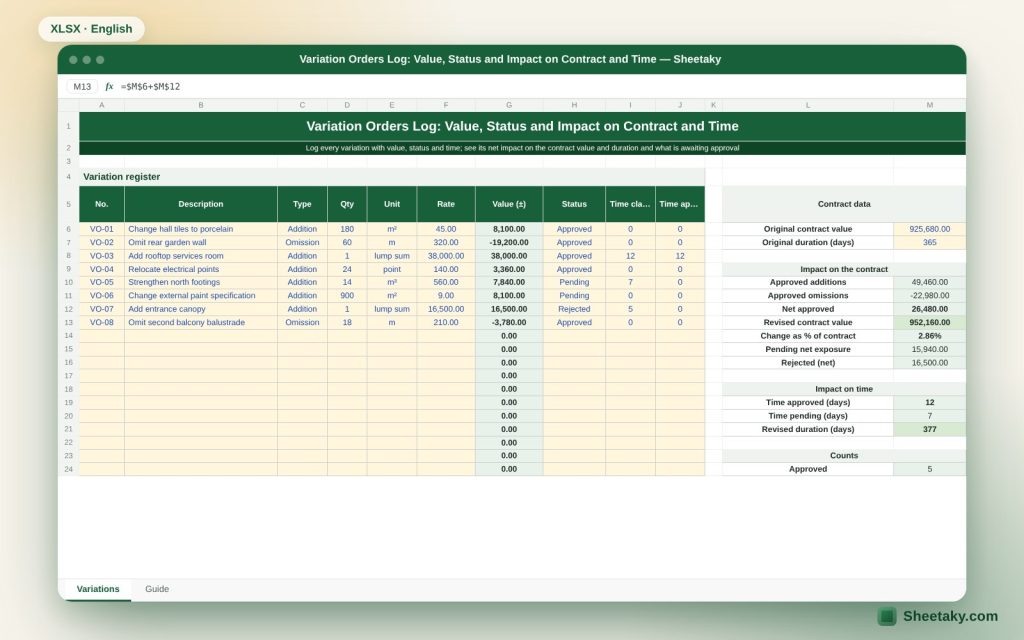
Ready to download
Editable Excel file
This sheet is also available in: العربية
Hardly any project is free of change: extra items, design amendments, changing quantities, omitted works. If changes are not recorded regularly part of them is lost, and the contractor finds at the end claiming sums it cannot prove, or the employer finds the cost has multiplied with nobody following it.
This sheet is an organised variation orders log. For each order it holds a number, date, description, reason, value (positive for additions and negative for omissions), days of extension requested and granted, and approval status. From the log comes a summary: original, approved, pending and revised contract value, the revised duration and the effect of changes as a percentage of the contract.
Who is it for?
- Contract and cost engineers at contractors and consultants
- Project managers
- Project owners following increases
- Subcontractors
What is inside the sheet?
- A log of 60 orders: number, date, description, reason, value, extension, status
- A summary by status: count and value of approved, pending and rejected
- Original and revised contract value after approvals
- Financial exposure if pending orders are approved
- Original and revised duration in days and finish date
- Changes as a percentage of the contract with a warning above a limit
- A guide sheet
How to use it
- Enter the contract data: original value, duration and start date.
- Add each variation order when issued or requested, with its current status.
- Enter the value as positive for an addition and negative for an omission, and the extension days granted.
- Update the status on approval or rejection.
- Read the summary: revised contract, exposure and new duration.
Formulas used
Revised contract value = original value + sum of approved ordersExposure = sum of pending orders (that may be approved)Revised duration = original + approved extension daysChange percentage = (approved total ÷ original value)
Worked example from the sheet itself
A contract of 5,000,000 with a duration of 365 days.
- Approved orders: +180,000 and −40,000, netting +140,000, so the revised contract is 5,140,000.
- A pending order of +95,000 gives an exposure of 95,000 and a possible value of 5,235,000.
- An approved extension of 20 days gives a revised duration of 385 days.
What a variation order is and who can issue it
A variation order is a formal instruction changing the scope of work: addition, omission or change in quantity, specification or sequence. The contract conditions say who may issue it, usually the employer or its representative such as the consultant. Working on verbal instructions is a gamble, so ask for written confirmation before executing, or you may find nobody recognises the value.
The sheet classifies each order by status: pending (requested or estimated but not approved), approved (signed) and rejected. This separates secured money from possible money.
Ways of valuing a variation
Contracts differ but the usual order is: first the BOQ rates if the work is similar, then similar rates adjusted pro rata, then a fair valuation at the actual cost of the work plus an allowance for overheads and profit (daywork or cost plus). Record the basis used for each order in the description to ease review.
Time extension and timely notice
A variation may delay the work and entitle the contractor to an extension of time. But most contracts require written notice within a set time of the event, and late notice may forfeit the right to extension or compensation. Record the date of notice in the sheet and set a reminder against the contract period.
The sheet does not decide entitlement to extension; it records what was agreed. Time analysis needs a programme and the critical path.
Financial exposure and cost control
The total of pending orders is what may be added to the contract if approved, and it matters to the employer for budget planning and to the contractor for cash flow. Watch the ratio of changes to the original value: an excessive rise signals incomplete design or weak change management.
Set an alert limit (say 10 percent of the contract) beyond which the percentage turns red.
Common mistakes
- Executing work before the written order is issued.
- Mixing proposed with approved orders in the revised contract value.
- Forgetting omission orders (their value is negative).
- Not recording extension days so the claim is lost.
- Non-sequential numbering that makes review hard.
Using the log in meetings
Print the summary before the monthly project meeting. Start with the oldest pending orders and ask what each lacks and who owns the next step. Update the statuses in the meeting itself.
Tips for best results
- Number orders sequentially and never reuse a number.
- Write the basis and reference document in the description.
- Review pending orders monthly.
Frequently asked questions
Do I enter an omission with a negative sign?
Yes, a negative value means an omission.
Does the sheet compute entitlement to extension?
No, it records what was agreed only.
How many orders?
60 orders.
Is it suitable for a subcontractor?
Yes, in the same way with the subcontract.
Download the sheet
Press the download button at the top of the page to get the Excel file. It includes a full guide sheet, yellow input cells and formulas protected from accidental edits. The sheet is also available in Arabic from the language switcher.
The sheet is a recording and calculation aid. Entitlement to variation and extension is set by the contract conditions.
Related sheets
Project management & contracting
Punch List in Excel: Tracking Closure and Handover Readiness
An Excel punch list for handover: log each item with location, discipline, priority and owner to get due…
Project management & contracting
Heavy Equipment Log in Excel: Cost, Utilisation, Maintenance and Insurance Alerts
An Excel register for owned and rented site equipment: start date, daily cost, fuel, operator and utilisation, with…
Project management & contracting
Submittals Log in Excel: Drawings, Samples, Delays and Float
An Excel sheet to track shop drawings, samples and data sheets sent to the consultant: review dates, status,…