Interim Payment Certificate from a BOQ in Excel: Retention, Advance, Deductions, VAT and Net Due
- XLSX
- 14 KB
- Version 1.0
- English
- October 23, 2026
Ready to download
Editable Excel file
This sheet is also available in: العربية
The interim payment certificate is the periodic invoice a contractor submits for work done up to a date. It is the most important document in the contractor’s cash flow, and any error either delays payment or costs the contractor money. Most contractors prepare it in Excel with scattered tables prone to mistakes.
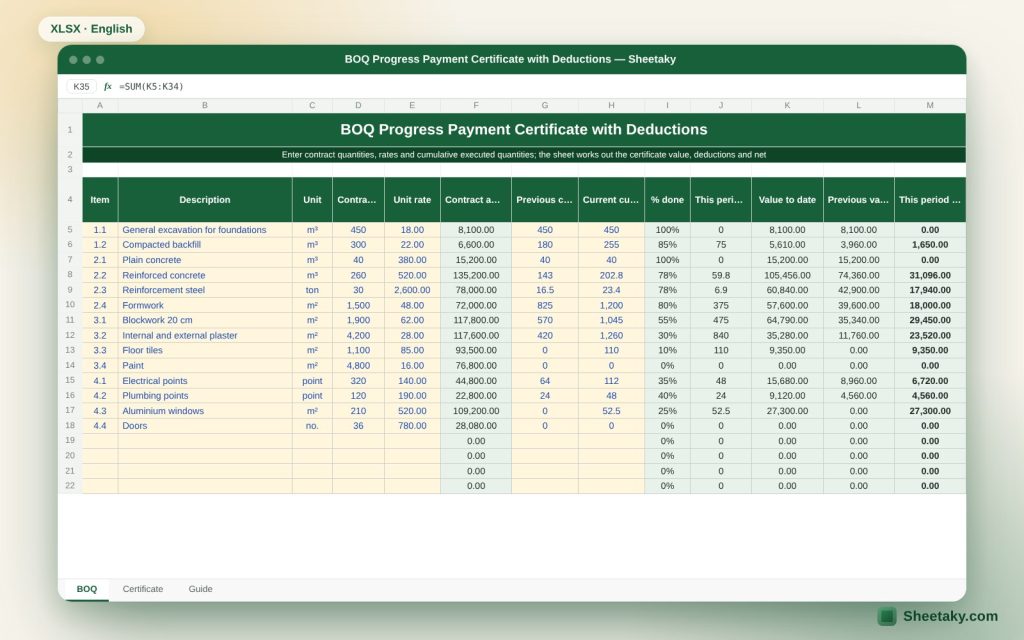
This sheet gathers the whole calculation in one place. The BOQ sheet holds items, contract quantities, rates and cumulative executed quantities, and the certificate sheet computes the cumulative value and then the deductions: retention, advance recovery, damages, previously paid, and VAT, producing the net due for this payment.
Who is it for?
- Quantity and cost engineers at contractors
- Consultant engineers reviewing certificates
- Small contractors preparing their own certificates
- Accountants at contracting companies
What is inside the sheet?
- A BOQ of up to 60 items: unit, contract quantity, rate and cumulative executed
- Percent complete per item with a warning when above the contract quantity
- Cumulative work value and total contract
- Retention with a percentage and a cap
- Pro-rata advance recovery
- Materials on site, damages and other deductions
- Previously paid, VAT and net due
- Comparison of financial and time progress
- A guide sheet
How to use it
- Enter the contract data: contract value, retention percentage and cap, advance payment and VAT rate.
- Enter the BOQ items with contract quantities and rates.
- In each certificate enter the cumulative executed quantity (not just this period) for each item.
- Enter materials on site, damages and other deductions if any, and the total previously paid.
- Read the net due and print the certificate sheet.
Formulas used
Cumulative item value = executed quantity × rateRetention = retention % × work value (capped at % × contract value)Advance recovery = advance × (cumulative work value ÷ contract value)Net before VAT = work + materials − retention − recovery − damages − previously paidVAT = net before VAT × rate
Worked example from the sheet itself
An illustration: cumulative work value of 1,000,000 with 10% retention = 100,000.
- An advance of 10% of a 4,000,000 contract is 400,000, and with financial progress at 25% the recovery to date is 100,000.
- Previously paid is 205,000. Net before VAT = 1,000,000 − 100,000 − 100,000 − 205,000 = 595,000.
- With 15% VAT the tax is 89,250 and the amount due is 684,250.
Why quantities are cumulative
A correct interim certificate builds each time on the total executed since the start of the contract and then deducts what was previously paid. The benefit is that percentage-based deductions such as retention and recovery are computed from the total directly with no accumulation of error, and that correcting a wrong quantity in an earlier certificate flows automatically into the current one.
If you enter only the period quantities and add them by hand you risk repeating or omitting an item. Keep the executed column cumulative and let the sheet compute the difference from the previous one.
Retention and its cap
A part of each payment (usually 5 to 10 percent) is held as security for good performance until the end of the defects period. Many contracts set a cap on the total retained, as a percentage of the contract value, and once it is reached retention stops. The sheet computes retention by percentage and then limits it to the cap.
Note: a common error is deducting retention twice, once from the work and once from materials on site or from the payment. Read the contract clause: is retention taken on materials? on variations? The sheet applies retention to the work value, and if your contract differs, adjust the formula or use the other deductions cell.
Advance payment recovery
The advance is paid to the contractor at the start and recovered gradually from certificates. The commonest method is pro-rata recovery with financial progress: each time the contractor completes 10% of the contract, 10% of the advance is recovered. Some contracts start recovery after a given progress or recover a fixed percentage of each certificate.
The sheet uses pro-rata recovery. If your contract uses another method, enter the value in the other deductions cell, and remember the cumulative recovery never exceeds the advance.
Materials on site
Some contracts allow including the value of materials delivered to site but not yet installed, at a percentage of their value (such as 80%), to be deducted later when they are built into the works. Enter the accepted material value in the dedicated cell. When the material is installed in a later certificate, make sure you do not count it twice, that is it leaves the materials cell as it enters the items.
Financial versus time progress
The sheet compares financial progress (work value to contract value) with the elapsed share of the contract period. If time is well ahead of financial progress the project is late and the contractor needs a recovery plan before delay damages are applied. It is an early warning tool and not a programme.
Common mistakes in certificates
- Entering a quantity above the contract quantity without an approved variation: the sheet highlights it.
- Deducting previously paid without checking the consultant-signed certificate.
- Applying VAT before or after deductions contrary to the contract or the tax law.
- Forgetting the advance recovery.
- Submitting quantities not agreed with the resident engineer on site.
Submitting and following up
A certificate usually carries attachments: inspection and acceptance records, quantity sketches or take-off, photos and material certificates. It is wise to agree quantities with the resident engineer on site before submitting. Record the dates of submission, approval and payment, because the payment period in the contract usually starts from a complete submission.
Tips for best results
- Keep a signed copy of every certificate as the reference for the cumulative.
- Check your contract terms: retention, materials and VAT differ between contracts.
- Do not enter in the sheet quantities not agreed on site.
Frequently asked questions
Is the sheet suitable for a FIDIC contract?
It applies the general logic (retention, advance, damages). Your contract clauses are the reference, and if they differ adjust the cells.
How many items?
Up to 60 items.
Does it handle variations?
You can add them as items, and for detail use the variation orders log sheet.
Is it suitable for a subcontractor?
There is a separate subcontractor sheet on the site.
Download the sheet
Press the download button at the top of the page to get the Excel file. It includes a full guide sheet, yellow input cells and formulas protected from accidental edits. The sheet is also available in Arabic from the language switcher.
The sheet is a calculation aid. The official payment terms are those of your contract.
Related sheets
Project management & contracting
Punch List in Excel: Tracking Closure and Handover Readiness
An Excel punch list for handover: log each item with location, discipline, priority and owner to get due…
Project management & contracting
Heavy Equipment Log in Excel: Cost, Utilisation, Maintenance and Insurance Alerts
An Excel register for owned and rented site equipment: start date, daily cost, fuel, operator and utilisation, with…
Project management & contracting
Submittals Log in Excel: Drawings, Samples, Delays and Float
An Excel sheet to track shop drawings, samples and data sheets sent to the consultant: review dates, status,…