Simple Invoice Template in Excel: VAT, Discounts and the Amount Due
- XLSX
- 16 KB
- Version 1.0
- English
- October 23, 2026
Ready to download
Editable Excel file
This sheet is also available in: العربية
Typing an invoice by hand or reformatting an old file for each customer eats time and creates errors in totals and VAT. A small business needs a clear template that calculates by itself and looks professional.
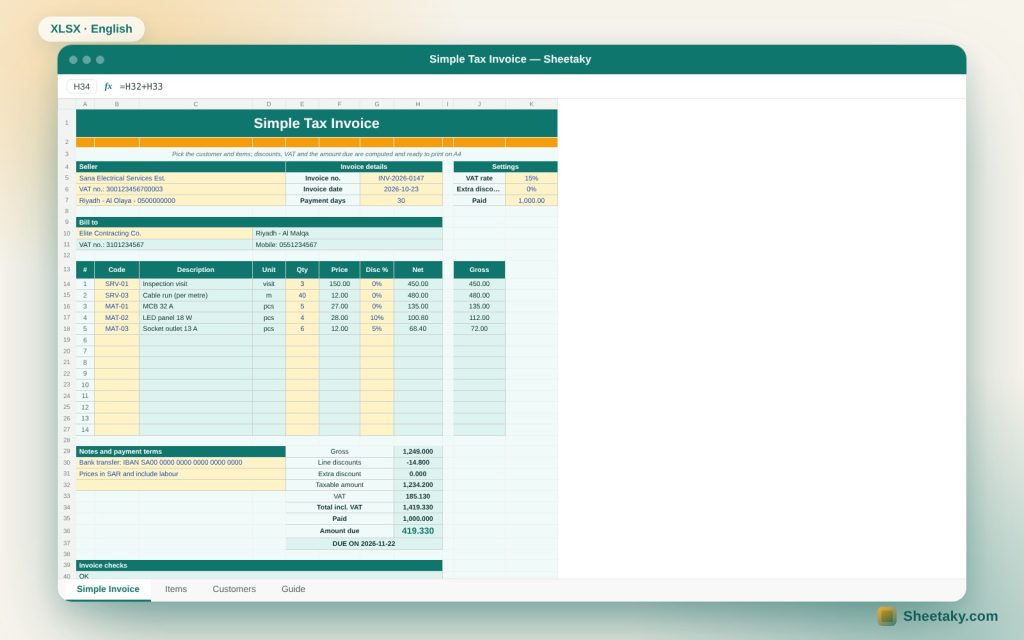
This template stores your items, prices and customers on two sheets. You pick the customer, then an item code, and type the quantity; the sheet fills in the description, unit and price, then calculates discounts, VAT, total, paid amount, balance and due date, and prints on A4 directly.
Who is it for?
- Small businesses and service providers
- Contractors, technicians and freelancers
- Shops that issue manual invoices
- Anyone who needs a quick quote or internal invoice
What is inside the sheet?
- An invoice of fourteen lines with item code, quantity and discount
- An item catalogue sheet that fills description, unit and price automatically
- A customers sheet that fills address, VAT number and mobile
- An editable VAT rate and an extra discount on the total
- Paid amount, amount due, payment status and due date
- Checks that catch an unknown code or a line without quantity
- A ready A4 print setup
How to use it
- Edit your business and invoice details at the top.
- Add your items and prices on the Items sheet and your customers on the Customers sheet.
- Pick the customer, then a code per line, and enter quantity and discount.
- Print the page or save it as PDF and change the invoice number each time.
Formulas used
Net = quantity × price × (1 − discount)Taxable amount = sum of net × (1 − extra discount)VAT = taxable amount × rateDue = total incl. VAT − paidDue date = invoice date + payment days
Worked example from the sheet itself
Five lines: inspection visit 3 × 150, cable run 40 m × 12, five breakers, four LED panels with 10% off and six sockets with 5% off.
- The taxable amount is 1,234.20 and 15% VAT is 185.13.
- The total including VAT is 1,419.33; with 1,000 paid, 419.33 is due.
- The due date falls thirty days after the invoice date.
A catalogue instead of typing
Typing an item price on every invoice produces conflicts between one invoice and the next. When the price lives once in the catalogue, one edit updates every new invoice and the description stays consistent in front of your customer.
How VAT is calculated
VAT is calculated on the amount after line discounts and the extra discount, meaning what the customer actually pays before tax. The default rate is 15% and it can be changed in the settings.
Limits of this template
This is a simplified template for internal use and small businesses. It does not generate a QR code or connect to the tax authority platform, and it does not replace e-invoicing where you are required to use it.
Tips for best results
- Number invoices in sequence and never reuse a number.
- Keep a PDF copy of every invoice you issue.
- Put payment terms and account details in the notes.
- Update catalogue prices when your cost changes.
Frequently asked questions
Is it suitable for e-invoicing?
No, it is a simplified template and does not replace the approved e-invoicing system.
How many items does the catalogue hold?
Sixty items and forty customers.
Can I turn VAT off?
Yes, set the rate to zero in the settings.
Download the sheet
Press the download button at the top of the page to get the Excel file. It includes a full guide sheet, yellow input cells and formulas protected from accidental edits. The sheet is also available in Arabic from the language switcher.
A simplified template, not tax advice; check the invoicing rules in your country.
Related sheets
Business & sales
Social Media Content Calendar in Excel: Plan the Month and Measure Every Post
An Excel sheet to plan social media content: log your posts to see the month in a colour…
Business & sales
Pricing and Margin Calculator in Excel: The Profitable Selling Price for Every Product
An Excel sheet to price products: enter cost, fees and VAT to see profit, margin, the suggested price…
Business & sales
Customer Debts Tracker in Excel: Aging, Overdue Amounts and a Collection Plan
An Excel sheet to track customer receivables: log credit invoices and payments to see total due, overdue, debt…