Arab Countries VAT Calculator in Excel: From a Price Before or After Tax
- XLSX
- 9 KB
- Version 1.0
- English
- October 23, 2026
Ready to download
Editable Excel file
This sheet is also available in: العربية
Anyone working across Arab countries knows the confusion: 15% here, 5% there, 14% in a third country, and sometimes the written price includes tax and sometimes it does not. This sheet brings it all into one page.
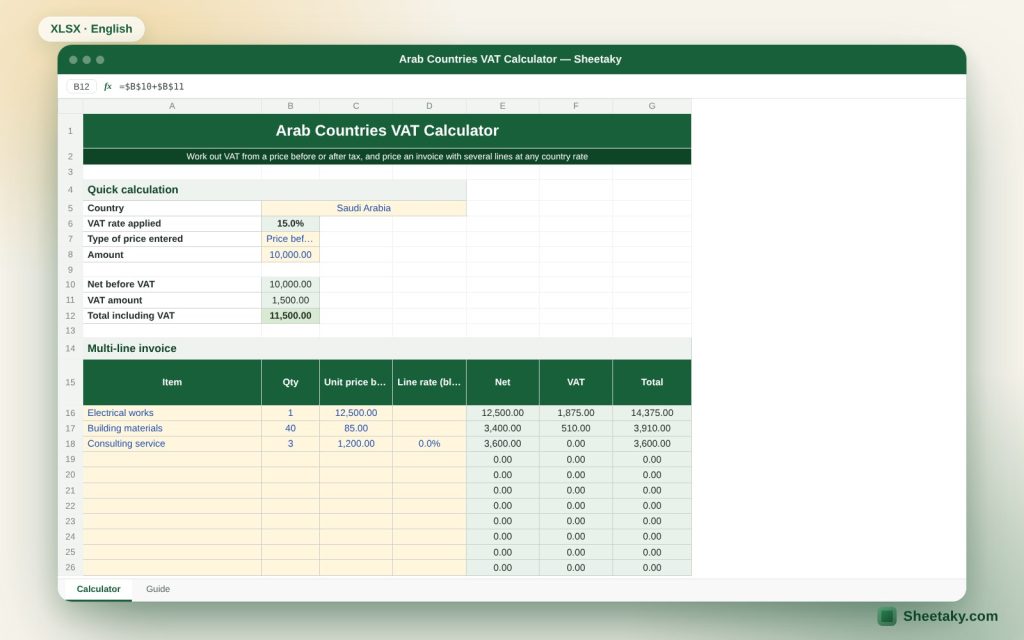
Pick the country from a list, enter the amount and say whether it is before or after tax, and you get net, VAT and total at once. For invoices you enter items and quantities, and each line can have its own rate when it is exempt or different.
Who is it for?
- Contractors and engineers pricing projects in more than one country
- Small business owners and accountants preparing quotations
- Freelancers and consultants invoicing clients in different countries
- Anyone who wants to know how much tax is inside a price that includes it
What is inside the sheet?
- A quick calculation: country, price type and amount, then net, VAT and total
- An invoice of twelve lines with quantity, unit price and an optional rate per line
- An editable rates table for twelve Arab countries
- Drop-down lists for country and price type, with input checks
- A full guide sheet
How to use it
- Pick the country from the first list.
- Choose whether the amount you will type is before tax or includes it.
- Enter the amount and read net, VAT and total.
- For an invoice enter items, quantities and prices before VAT. Leave the line rate blank to use the country rate, or type 0% for an exempt line.
Formulas used
Net from a tax-inclusive price = amount ÷ (1 + rate)VAT = net × rateTotal = net + VATLine VAT = quantity × unit price × line rate or country rate
Worked example from the sheet itself
Example: an amount of 10,000 before tax in Saudi Arabia at 15%.
- VAT is 1,500 and the total is 11,500.
- An invoice of three lines: electrical works 12,500 (once), building materials 40 × 85, consulting 3 × 1,200 at 0%.
- Net 19,500, VAT 2,385 and total 21,885.
Tips for best results
- When the price includes tax pick “Price includes VAT”: the correct tax is found by dividing by (1 + rate), not by subtracting the rate directly.
- Exempt or zero-rated goods and services get 0% in the line rate column.
- Edit the rates table at the bottom when a rate changes in your country or to add another country.
Frequently asked questions
Are the rates always up to date?
The listed rates are the standard rates known when the sheet was made, and the table is editable because rates can change. Check your tax authority.
Why are Qatar and Kuwait at zero?
Because no VAT was in force there when the sheet was made. Edit the rate if it starts.
Does the sheet replace the official e-invoice?
No. Some countries require an approved e-invoicing system. The sheet is a calculation and pricing tool only.
Download the sheet
Press the download button at the top of the page to get the Excel file. It includes a full guide sheet, yellow input cells and formulas protected from accidental edits. The sheet is also available in Arabic from the language switcher.
A guidance calculator, not tax advice.
Related sheets
Business & sales
Simple Invoice Template in Excel: VAT, Discounts and the Amount Due
A print-ready Excel invoice: an item and customer catalogue that fills in details automatically, per-line discount, VAT, paid…
Business & sales
Social Media Content Calendar in Excel: Plan the Month and Measure Every Post
An Excel sheet to plan social media content: log your posts to see the month in a colour…
Business & sales
Pricing and Margin Calculator in Excel: The Profitable Selling Price for Every Product
An Excel sheet to price products: enter cost, fees and VAT to see profit, margin, the suggested price…