Social Media Content Calendar in Excel: Plan the Month and Measure Every Post
- XLSX
- 36 KB
- Version 1.0
- English
- October 23, 2026
Ready to download
Editable Excel file
This sheet is also available in: العربية
Random posting tires a team and never builds an audience. You post three times today, vanish for a week, and at month end you do not know which content type worked or which platform deserves your effort.
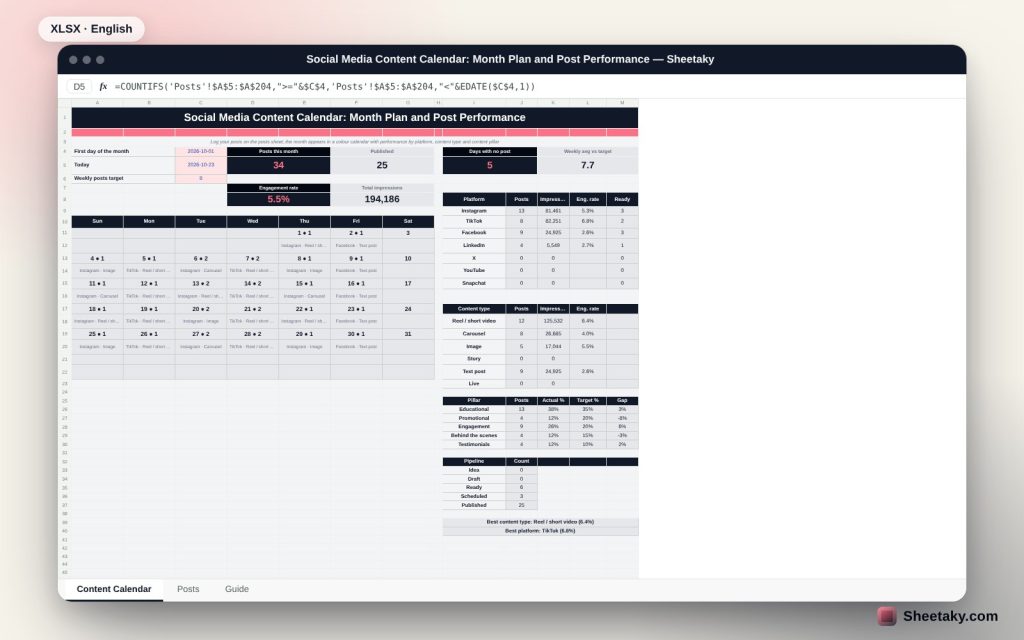
This sheet puts the plan and the measurement in one place. You log each post with its date, platform, type, pillar and status, and it draws the month calendar and exposes empty days. After publishing you add impressions and engagement, and it compares platforms and content types and shows whether your pillar mix matches your plan.
Who is it for?
- Social media managers and marketers
- Shop, clinic and restaurant owners who run their own accounts
- Solo content creators
- Small agencies managing several accounts
What is inside the sheet?
- A posts sheet of 200 rows with dropdowns for platform, type, pillar and status
- A colour monthly calendar showing post count and details for each day
- Performance per platform: posts, impressions and engagement rate
- Performance per content type: reels, carousels, images and text
- Content pillars compared with target percentages
- A pipeline: idea, draft, ready, scheduled, published
- The best platform and best content type picked automatically
How to use it
- Fill your platforms, content types, pillars and team names in the lists.
- Log each post with date, platform, type and status.
- After publishing enter impressions, likes, comments, shares and saves.
- Change the first day of the month to move between months and review the gaps.
Formulas used
Engagements = likes + comments + shares + savesEngagement rate = engagements ÷ impressionsGap to target = actual pillar share − target shareDays without a post = days in the month − days with a post
Worked example from the sheet itself
34 posts in the month, 25 published, 6 ready and 3 scheduled.
- Total impressions are 194,186 and the engagement rate is 5.5%.
- TikTok is the top platform at 6.8% and reels the best type at 6.4%.
- Promotional content is 12% actual against a 20% target, educational 38% against 35%.
- Five days in the month have no post.
Why content pillars
A pillar is the purpose of a post: teach, promote, engage, behind the scenes or customer voice. An account that promotes in every post drives its audience away, while one that never promotes does not sell. So you set a share for each pillar and compare it with actual every month; the sheet highlights a large gap.
Engagement rate beats likes
A post with ten thousand impressions and fifty engagements is weaker than one with a thousand impressions and a hundred engagements. Engagement rate compares different platforms on one basis and shows the content type worth repeating.
Consistency before volume
Four regular posts a week beat ten posts followed by silence. The calendar shows empty days and compares your weekly average with the target, so you plan two weeks ahead instead of reacting daily.
The pipeline
Tracking a post from idea to draft to ready to scheduled to published shows where work piles up: many drafts and few ready posts mean the bottleneck is review, not ideas.
Tips for best results
- Fix one day a week to plan the next week.
- Capture an idea the moment it appears with the status idea.
- Repeat the best content type but do not drop the others entirely.
- Enter performance 48 hours after publishing.
Frequently asked questions
How many posts does it hold?
Two hundred posts, enough for several months; copy rows to extend.
Does it pull numbers from the platforms?
No, you enter numbers by hand from each platform insights.
Can I rename the platforms?
Yes, from the lists on the posts sheet.
Download the sheet
Press the download button at the top of the page to get the Excel file. It includes a full guide sheet, yellow input cells and formulas protected from accidental edits. The sheet is also available in Arabic from the language switcher.
Figures are illustrative and vary with your account and audience.
Related sheets
Business & sales
Simple Invoice Template in Excel: VAT, Discounts and the Amount Due
A print-ready Excel invoice: an item and customer catalogue that fills in details automatically, per-line discount, VAT, paid…
Business & sales
Pricing and Margin Calculator in Excel: The Profitable Selling Price for Every Product
An Excel sheet to price products: enter cost, fees and VAT to see profit, margin, the suggested price…
Business & sales
Customer Debts Tracker in Excel: Aging, Overdue Amounts and a Collection Plan
An Excel sheet to track customer receivables: log credit invoices and payments to see total due, overdue, debt…