Recruitment Tracker in Excel: Candidate Funnel, Sources and Time to Hire
- XLSX
- 25 KB
- Version 1.0
- English
- October 23, 2026
Ready to download
Editable Excel file
This sheet is also available in: العربية
Hiring gets lost in email and scattered tables: you do not know how many candidates remain at interview, why the sales role is late or which source brings the best people. And each week a role stays empty costs you output or sales.
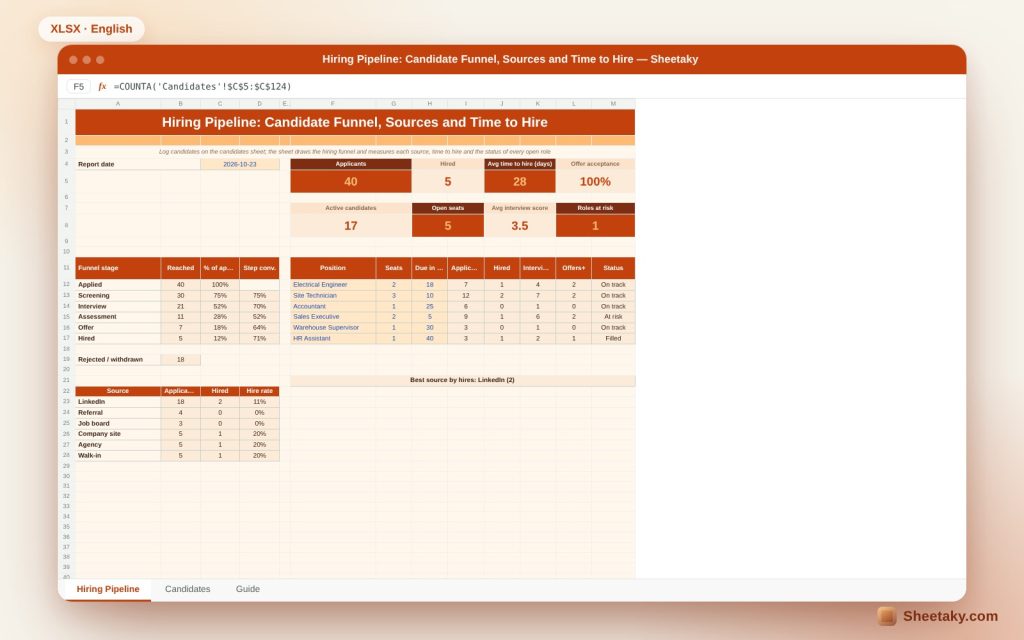
This sheet gives you one board: log a candidate once with position, source and stage, and it draws the funnel from application to hire with the conversion between stages, calculates time to hire and offer acceptance, and labels each role as filled, on track or at risk.
Who is it for?
- Hiring managers in small and medium companies
- Owners who recruit themselves
- Recruitment agencies
- Department heads following their open roles
What is inside the sheet?
- A candidates sheet of 120 records with dropdowns
- A six-stage funnel: applied, screening, interview, assessment, offer, hired
- A roles table with seats, applicants, hires and status
- Source effectiveness and hire rate per source
- Time to hire, offer acceptance and average interview score
- Two charts for the funnel and sources
How to use it
- Enter your roles with seats and due days.
- Log each candidate with position, source and application date.
- Update the stage at every step; for a rejection pick the last stage reached.
- Review roles at risk and the best sources.
Formulas used
Reached a stage = candidates who reached or passed itStep conversion = reached ÷ reached in the previous stageTime to hire = closing date − application dateOffer acceptance = hired ÷ (hired + withdrawn after an offer)
Worked example from the sheet itself
Forty applicants, five hired and seven reached the offer stage.
- The funnel runs 40, 30, 21, 11, 7, 5, which is 12% of applicants.
- Average time to hire is 28 days and the average interview score is 3.5.
- The sales executive role is at risk: it closes in five days and only one of two seats is filled.
- Five seats are still open and seventeen candidates are active.
Reading the funnel
The funnel shows where talent leaks. If screening to interview converts at 70% and interview to assessment at 52%, interviews remove about half, so review your screening criteria so interviews are not wasted on poor fits.
Which source deserves spend
A source that brings a hundred CVs and hires none is worth less than one that brings five and hires two. Hire rate per source tells you where to direct ads and agency fees.
Time to hire
Every day a role stays open costs you. The sheet measures from application to closing the file, and comparing roles shows the slowest step, usually scheduling interviews or approving the offer.
Offer acceptance
If many people reject your offers the problem is usually salary or a slow offer. Acceptance rate is an early signal worth reviewing before you lose a good candidate.
Tips for best results
- Reject a candidate clearly instead of ignoring them.
- Record the score right after the interview.
- Send the offer within 48 hours of the decision.
- Always ask the candidate for their source.
Frequently asked questions
How many candidates does it hold?
A hundred and twenty records, and you can extend by copying rows.
Can I add stages?
The stages are fixed in the calculation; use the assessment for any extra step.
How do I record someone who declined the offer?
Set their stage to withdrawn and their last stage to offer.
Download the sheet
Press the download button at the top of the page to get the Excel file. It includes a full guide sheet, yellow input cells and formulas protected from accidental edits. The sheet is also available in Arabic from the language switcher.
Figures are illustrative; do not keep sensitive candidate data in a shared file without protection.
Related sheets
HR & payroll
Annual Performance Review in Excel: Goals, Competencies, Final Score, Raise and Bonus
An Excel sheet to review employee performance: rate 1 to 5 on weighted goals and competencies to get…
HR & payroll
Salary Breakdown and Allowances Calculator in Excel: Net Pay, GOSI and Employer Cost
An Excel sheet that splits a package into basic, housing and transport, then calculates overtime, absence, GOSI, net…
HR & payroll
Leave Balance Tracker in Excel: Entitlement, Used, Remaining and Balance Value
An Excel sheet to track annual and sick leave balances per employee: log requests to get actual working…